
Keep every repair connected to its customer
A customer leaves an item for repair. The technician needs the reported fault, the counter needs the agreed estimate, and the owner needs to know whether a part has arrived and the invoice has been paid. When these details live in separate messages and notebooks, even a small repair can become difficult to follow.
Repair shop management software should connect the customer, item, requested work, progress and payment record. Darzee’s configurable repair workflow brings intake, diagnosis notes, approvals, technician work and pickup into a connected service-order process. This guide shows a practical way to organise that process, while identifying the specialist features to check before choosing software.
1. Record the request clearly at customer drop-off
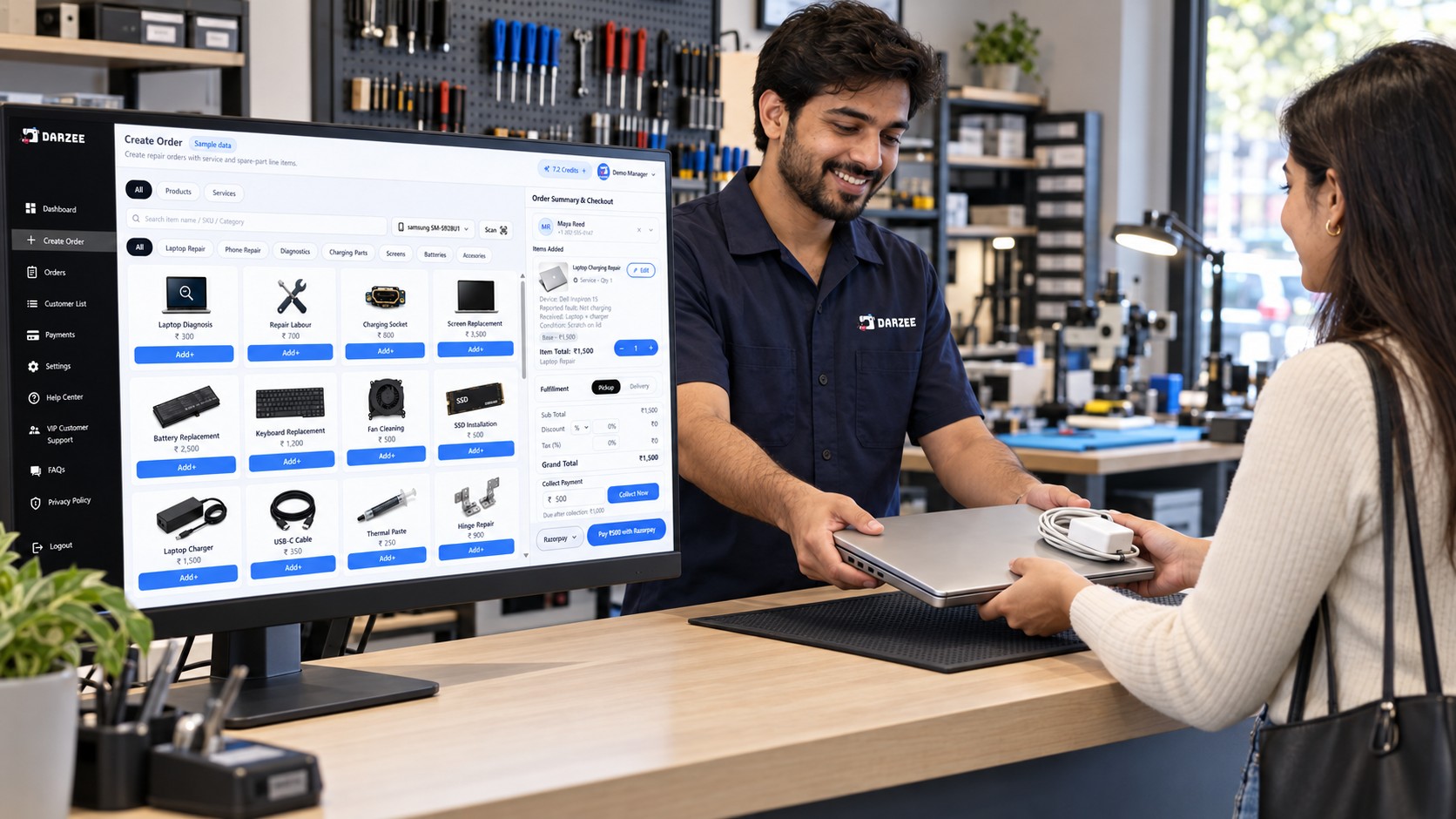
Start with a customer-linked order and enough information to identify the item safely. Darzee’s repair-business workflow describes intake photos and condition records, so the team can refer back to what arrived and the work requested.
- Customer: name, preferred contact method and collection contact.
- Item: type, model and identifying details relevant to the repair.
- Condition: visible marks, damage and accessories received.
- Reported issue: the customer’s description, kept separate from the technician’s findings.
- Next commitment: when the team will provide a diagnosis or estimate.
For example, “laptop does not charge; charger included; scratch on lid” is more useful than “laptop repair.” Give the customer an order reference and use that reference throughout the job. Record identifiers where your setup supports them; structured serial-number diagnostics need a separate demonstration.
2. Connect diagnosis, estimate and approval
A diagnosis explains the proposed work. An estimate explains the likely charges. Approval records what the customer agreed to. Keep these distinct so a technician does not treat an estimate as permission to proceed.
Darzee describes diagnosis, estimate and approval notes within its repair workflow. Record the proposed service, parts charges and any conditions before work starts. If diagnosis reveals additional work, obtain approval for the revised scope and price before continuing.
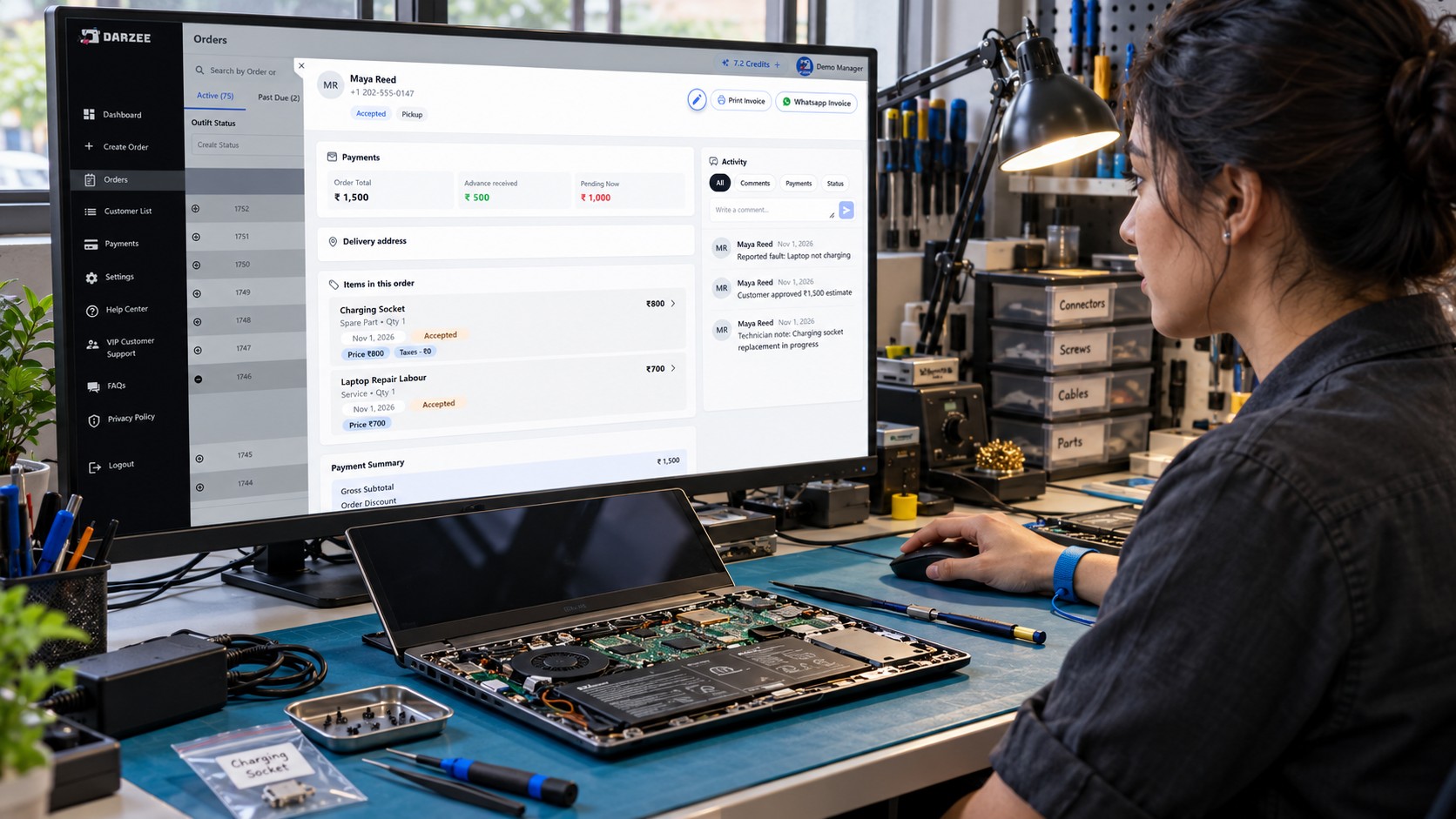
Example: an illustrative laptop repair includes a replacement charging socket at ₹800 and labour at ₹700. The proposed total is ₹1,500 before any applicable tax. A ₹500 deposit leaves ₹1,000 to collect if the final approved total stays the same. These are sample figures, not Darzee pricing or a customer result.
3. Track repair jobs with clear work stages
Useful repair job tracking software tells staff both where a job stands and what must happen next. Darzee’s order management connects customer history, order status, dates and payment context. Its repair pages describe technician assignments, jobsheets and work stages.
The following is a suggested operating workflow to configure and verify in your version. It is not a claim that every label is a preset Darzee status.
| Stage | Record before moving forward | Next action |
|---|---|---|
| Received | Customer request, condition and accessories. | Assign diagnosis responsibility. |
| Diagnosis | Findings, proposed work and estimate. | Ask for approval. |
| Awaiting approval | Estimate sent and outstanding questions. | Record the customer’s decision. |
| Awaiting parts | Required part and expected availability. | Follow up with the supplier through your purchasing process. |
| In repair | Assigned technician and approved scope. | Complete the work and testing. |
| Ready for collection | Test outcome, final bill and balance. | Contact the customer. |
| Collected | Handover and payment confirmation. | Close the service order. |
Make one person responsible for each open job. Use the jobsheet to carry the agreed work and relevant notes, and verify the exact jobsheet fields, printing and technician access during a demo. A promised date on an order does not by itself establish a technician scheduling calendar.
4. Track spare parts and supplies alongside the job
Spare parts inventory management starts with identifying the correct part and recording how it is used. Darzee’s inventory module describes products and variants, SKU or barcode identification, structured stock locations and connected checkout. Its repair workflow also describes parts and service charges.
Those capabilities provide a starting point, but a part charged on an invoice is not automatically proof that physical stock has been reserved or deducted. Test the complete movement in your configuration.
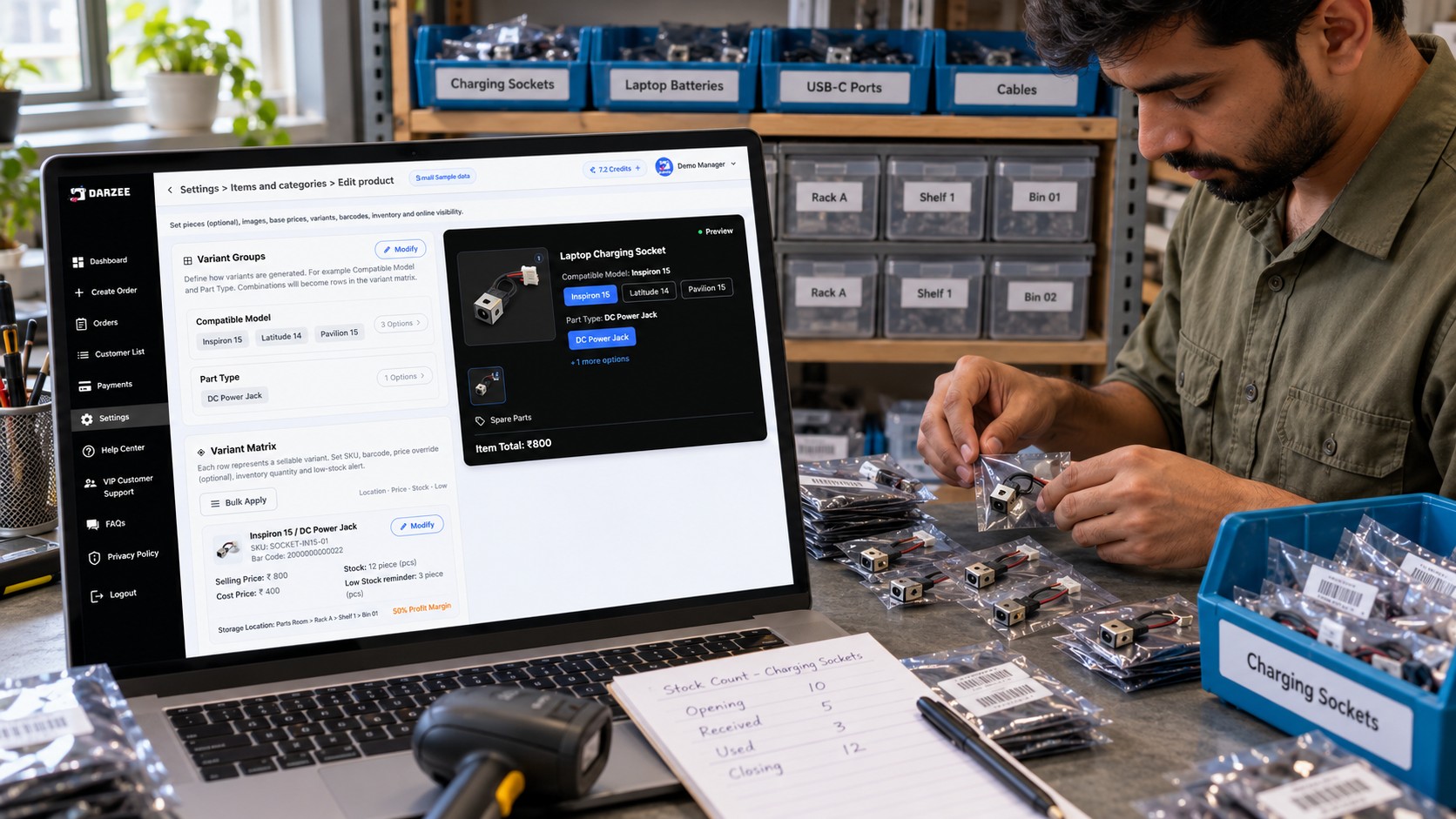
- Identify the part. Use a clear name and SKU, including the compatible model where relevant.
- Record the location. Make the item easy to find on the correct rack, shelf or bin.
- Link the charge to the repair. Keep parts and labour distinguishable in the order.
- Verify stock movement. Demonstrate what happens when a part is added, used, removed or returned.
- Count physical stock. Compare quantities with recorded activity and investigate differences.
For example, if the shelf starts with 10 charging sockets, receives 5 and uses 3, the expected closing count is 12, before returns or adjustments. Keep a usage log if your demonstrated Darzee setup does not record every movement. Confirm serialized parts, reservations, supplier procurement and warranty returns separately.
5. Keep repair invoices, deposits and balances together
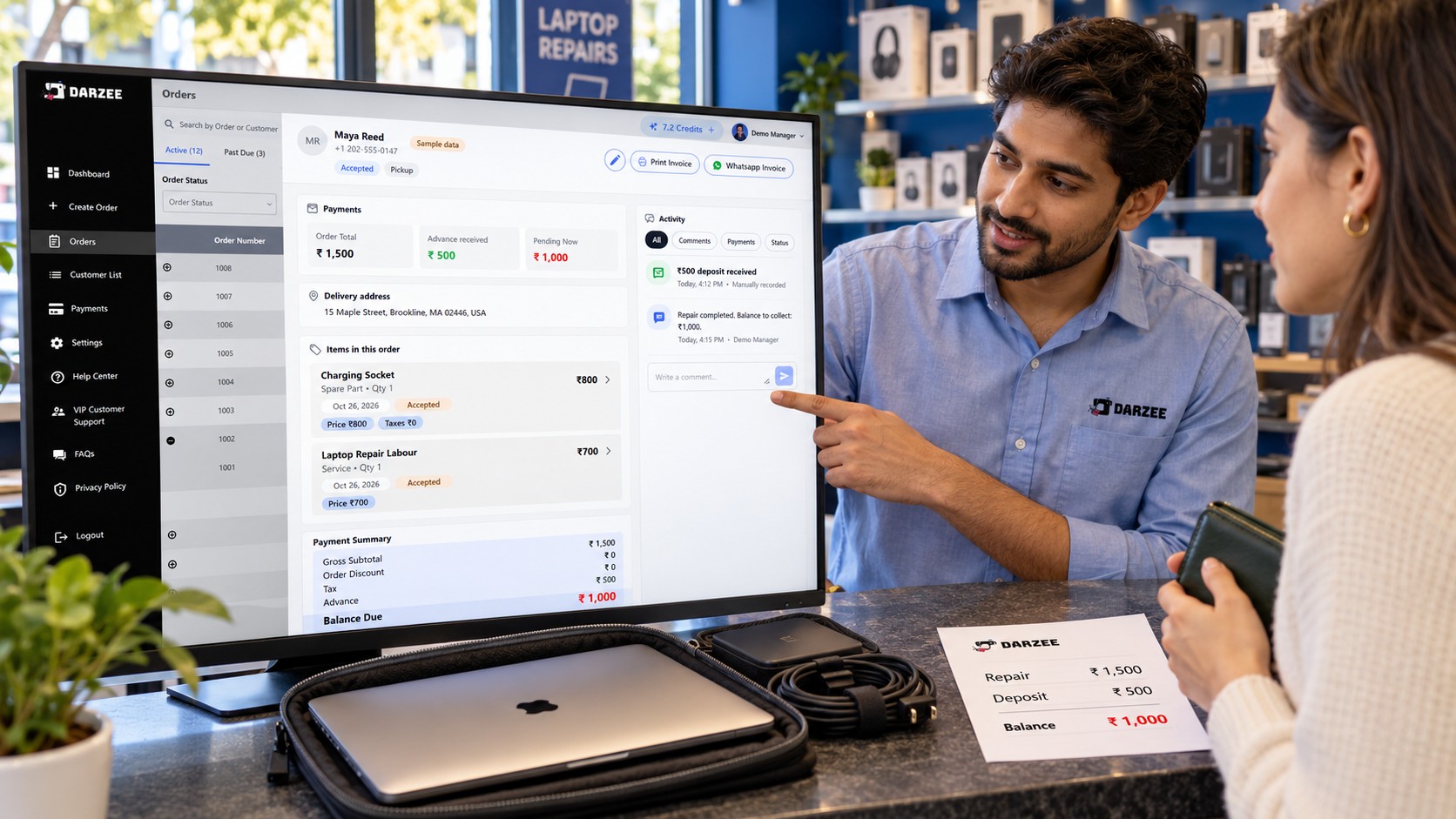
Good repair shop billing software lets the counter explain the final bill without searching through messages. Darzee connects invoices and payment records with the customer order, including deposits, partial payments and remaining balances.
Before collection, compare the final charges with the approved work. Check that parts, labour, discounts and applicable taxes are recorded correctly in your setup. For the ₹1,500 sample repair with a ₹500 deposit, the remaining balance is ₹1,000. A changed estimate requires a fresh check of both the approval and the balance.
Darzee’s payments and checkout workflow describes cash, business-owned payment QR codes and connected providers. Staff must verify receipt for manually recorded methods: displaying a saved QR does not automatically confirm payment. Provider, country, device and version availability apply; the website identifies parts of the new payment experience with the December 1, 2026 launch.
6. Confirm completion and arrange collection
Before marking a job ready, record the completed work and the relevant test result. Check the item and accessories against the intake record, confirm the final amount and tell the customer what they need for collection.
Darzee’s repair pages describe customer updates and pickup communication. When comparing service order tracking software, verify how those updates are sent in your actual setup. Ask whether staff send them manually or a status change triggers them, which channels are supported, and whether delivery history is visible. Do not assume automatic SMS, email or WhatsApp notifications from a general communication feature.
At handover, confirm the recipient, payment and items returned according to your shop’s process. Explain any service terms you offer; manufacturer warranty handling and specialist warranty management should be checked independently.
Where Darzee helps repair and maintenance shops
Darzee’s value is the connection between the customer, commercial order and work being carried out. A shop can organise products, services and repair charges in the same broader workflow, rather than reconstructing the job from separate bills and notes.
- Customer context: keep the order linked to the person who requested the repair.
- Work context: use intake, diagnosis and approval notes to explain the agreed task.
- Operational context: follow technician assignments and configured work stages.
- Commercial context: review parts or service charges, invoices and payment balances.
For electronics and device repairs, Darzee’s website explicitly distinguishes this workflow from specialist diagnostics, IMEI or serial tools, warranties, trade-ins and parts procurement. Maintenance businesses needing recurring visits, dispatch or technician route planning should also request a specific demonstration. Choose according to the work your team actually performs.
A repair-shop software demo checklist
Ask the Darzee team to follow one sample repair from intake to collection:
- Create the customer and item record, including condition photos.
- Add diagnosis findings, an estimate and approval notes.
- Assign a technician and show the jobsheet they receive.
- Move the order through your required stages and show overdue work.
- Add a spare part and demonstrate its effect on inventory.
- Record a deposit, generate the invoice and collect the balance.
- Show the actual pickup message process and collection record.
- Confirm scheduling, notification automation and specialist requirements, plus availability and total cost.
A simple daily repair-shop routine
At opening, review new intakes, jobs waiting for approval and parts that block progress. During the day, update each order when responsibility or status changes. Before closing, check ready-for-collection jobs, payment balances and parts used. A short daily review is useful only when staff keep the underlying records current.
Frequently asked questions
What should repair shop management software track?
It should connect customer requests, item condition, diagnosis, approved work, responsibility, progress, charges and collection. Specialist needs depend on the repair type.
Can Darzee help track repair jobs?
Darzee describes a configurable repair workflow covering intake, diagnosis and approval notes, technician jobsheets, work stages, charges and pickup communication. Verify the exact stages, access and availability in your version.
Can Darzee manage spare parts inventory?
Its inventory module describes products, variants, identification and storage locations, while repair orders can include parts charges. Test stock deduction, reservation, returns and any serialized parts requirements before relying on them.
Does Darzee include job scheduling and automatic notifications?
The referenced workflows do not establish a full technician scheduling system or every automated notification trigger. Ask for a demonstration of the calendar, channels and automation you need.
Bring your repair workflow to a Darzee walkthrough
Start with a real type of job your shop handles regularly. Bring your intake checklist, status stages, parts list and invoice requirements so the team can demonstrate the full process.
Explore Darzee for your repair business or discuss your repair-shop workflow with Darzee.

